18 minutes
The Graph Delegation Overview
Delegation lets GRT holders take part in securing The Graph Network without running any infrastructure. That makes it the main way for non-technical contributors to participate in the protocol. Delegators delegate their GRT to Indexers, which increases the stake that Indexers can allocate to serving data, and in return Delegators get a share of the rewards those Indexers earn.
To start delegating, check out the Delegate on The Graph page or visit the Indexers table for more extensive metrics for all Indexers.
Benefits of Delegating on The Graph
The core benefits of delegating on The Graph are:
- Earn a portion of rewards generated by your chosen Indexer(s).
- Strengthen the network’s security and scalability by supporting Indexers.
- Take part in The Graph community without running any technical infrastructure.
How Delegation Works on The Graph
Delegators can passively earn GRT rewards from the Indexer(s) they choose to delegate their GRT to. An Indexer’s ability to process queries and earn rewards depends on three key factors:
- The Indexer’s self-stake (or GRT staked by the Indexer),
- The total GRT delegated to Indexers by Delegators, and
- The price the Indexer sets for serving queries.
The more GRT staked by and delegated to an Indexer, the more queries they can serve, leading to higher potential rewards for both the Indexer and the Delegator.
Buying and Bridging GRT for Delegation
Delegation on The Graph Network happens on Arbitrum One, so a Delegator needs GRT in a wallet on Arbitrum One before they can delegate. Arbitrum One is the network where protocol staking, delegation, and curation settle. GRT first launched on Ethereum mainnet, and many exchanges still send GRT to Ethereum by default.
To get started, a Delegator gets GRT on a centralized or decentralized exchange and sends it to a self-custody wallet (EOA or multisig). If the GRT arrives on Ethereum mainnet, the Delegator must bridge GRT to Arbitrum One. If the exchange supports withdrawals directly to Arbitrum One, the Delegator can skip the bridge. When the GRT is on Arbitrum One, the Delegator connects the wallet to Graph Explorer, chooses an Indexer, and delegates.
The Graph’s guides do not cover wallet setup, such as installing MetaMask. The Ethereum community provides a comprehensive resource regarding wallets.
How to Delegate on The Graph
Work through these steps before you choose where to delegate:
- Choose a Data Service
- Compare Indexers on the Subgraph Service
- Calculate Estimated Indexer APR
- Check Indexer Capacity and Eligibility
- Research Indexer Contribution Quality
- Evaluate Delegation Costs and Risks
Choosing a Data Service
The introduction of Graph Horizon turned the protocol into a multi-service framework, meaning that delegation happens for each data service. Currently, only the Subgraph Service supports delegation. As more data services add delegation, Delegators will choose both:
- A data service: A data service that supports delegation.
- An Indexer: The operator or provider you delegate to on that service.
Your delegation earns rewards based on the Indexer’s activity on the data service you delegated to. If you delegated GRT before Graph Horizon launched, your delegation was automatically migrated to the Subgraph Service, and no action was required.
Comparing Indexers
The Delegate page in Graph Explorer lists Indexers with their estimated APR, query fees, allocated stake, indexing rewards, and the Subgraphs they serve. Most Delegators start with estimated APR, then check each Indexer’s delegation capacity, rewards eligibility, and contribution quality. The sections below cover each one.
Estimated Indexer APR
Estimated APR is the quickest way to compare what Indexers pay their Delegators. It changes over time, so treat it as a guide, not a guaranteed return.
How Estimated APR Is Calculated
Graph Explorer bases an Indexer’s estimated APR on the rewards that reached its delegation pool over the last 7 days, annualized. These are the rewards left for Delegators after the Indexer takes its indexing reward cut and query fee cut. The rewards are divided by the delegation that is actively earning, so GRT that is thawing after an undelegation request does not drag the figure down.
Because it looks back only 7 days, estimated APR can move sharply. Common reasons include:
- Allocation timing: Indexing rewards are paid when an Indexer closes or collects on an allocation, which it can do at any point in a 1 to 28-day window. An Indexer that has not collected recently can show a lower APR than it will actually pay.
- Unallocated stake: An Indexer that does not allocate all the GRT available to it earns less on that stake, for itself and its Delegators.
- Changes to the cuts: An Indexer can change its indexing reward cut and query fee cut, which changes the share that goes to Delegators.
- New delegation: More GRT in the delegation pool splits the same rewards among more stake, which lowers the APR for everyone in the pool.
- Rewards eligibility: If an Indexer stops qualifying under the Rewards Eligibility Oracle, its indexing rewards stop, and its APR drops with them.
Indexing Reward Cut and Query Fee Cut
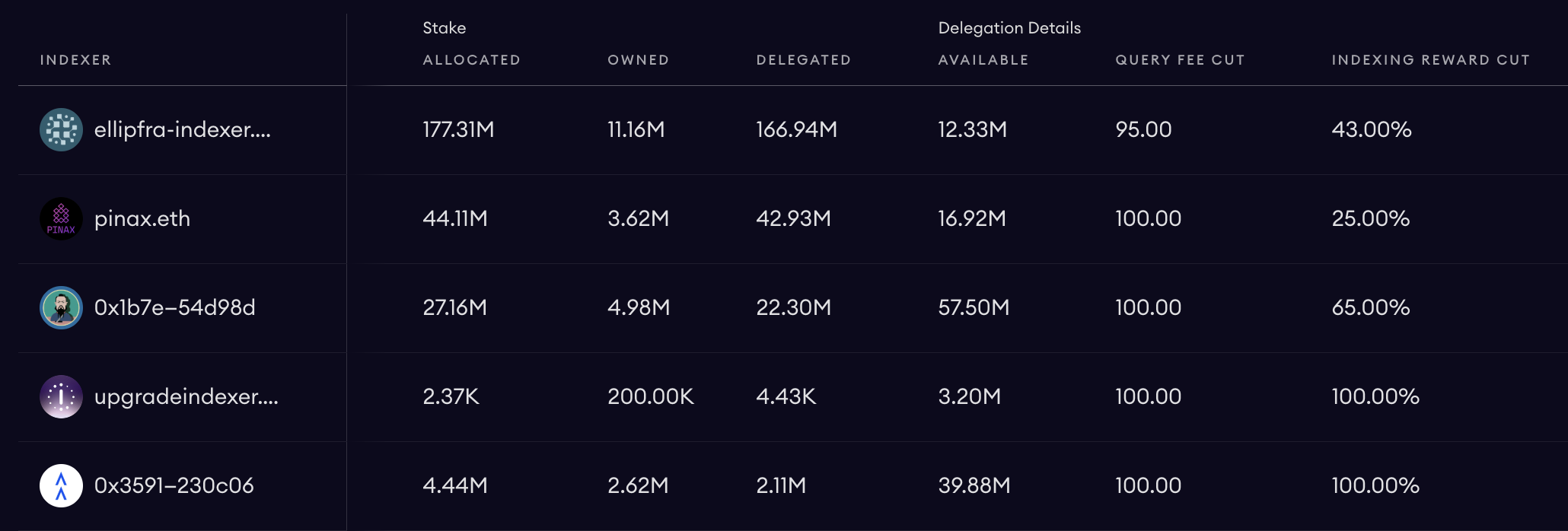
Each Indexer sets two cuts that decide how rewards are split with its Delegators:
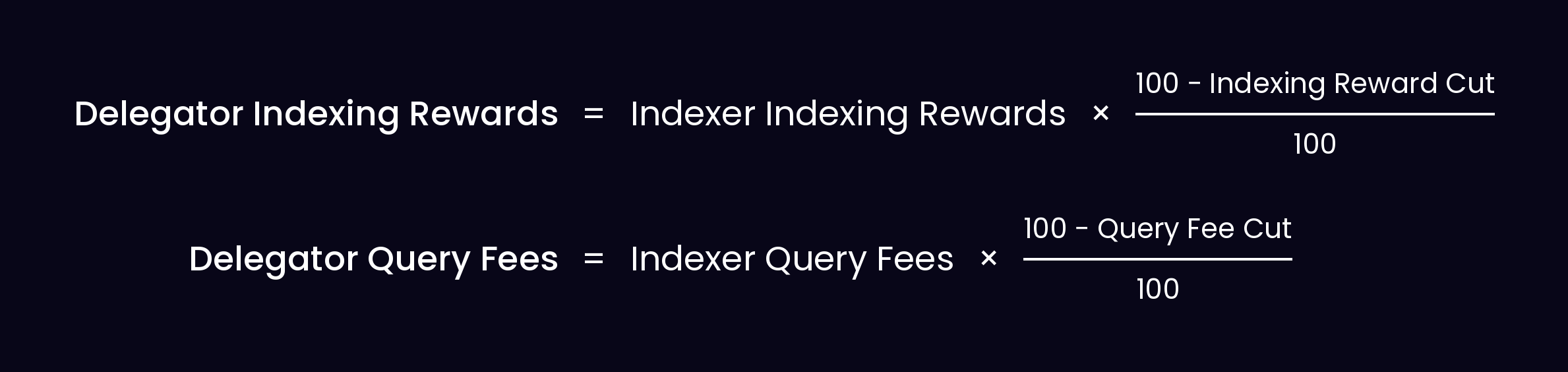
- Indexing Reward Cut: The share of indexing rewards the Indexer keeps. At 100%, Delegators get no indexing rewards. At 80%, Delegators receive 20%.
- Query Fee Cut: The same idea, applied to the query fees the Indexer collects.
Delegators earn from what is left after these cuts:
Look for Indexers that are transparent about how they set their cuts and that do not change them often.
Your Share of the Delegation Pool
Rewards for Delegators are split across the Indexer’s delegation pool in proportion to how much each Delegator has deposited. Your share of the pool is:
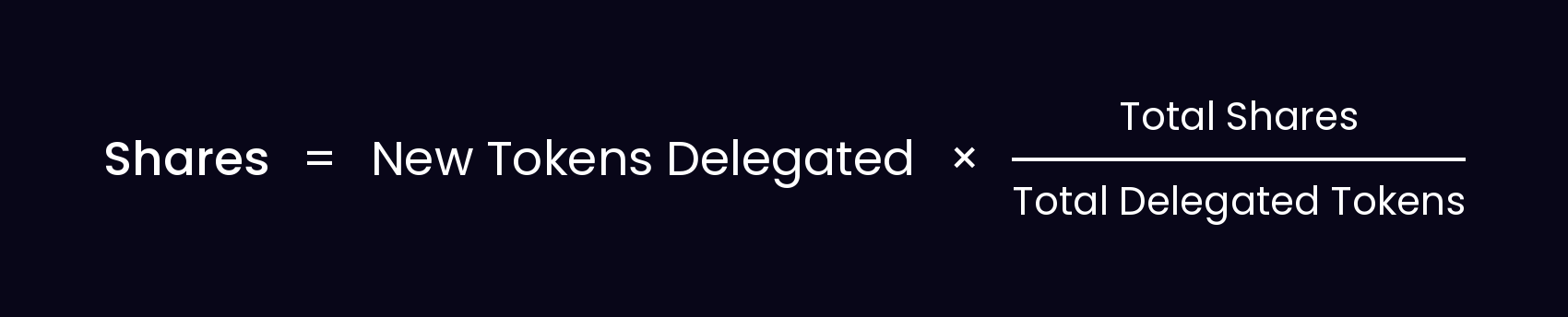
This means a low cut does not guarantee a better return. An Indexer that gives Delegators only 20% of rewards can pay more than one that gives 90% if its rewards are larger or its delegation pool is smaller. Estimated APR already accounts for both, which is why it is the starting point for most Delegators.
Using the ROI Calculator
The Calculate your ROI tool on the Delegate page projects how a delegation could grow. Enter an initial deposit, an optional monthly contribution, an APR, and the number of months, and the chart shows the estimated total value over that period. The projection assumes the APR holds steady, which it rarely does, so try a lower APR than the current estimate to see a more conservative outcome.
Indexer Delegation Capacity and Rewards Eligibility
After comparing estimated APR, check that an Indexer has room for more delegation and is eligible for indexing rewards.
How Does Delegation Capacity Impact Delegating?
Delegation capacity is the maximum amount of GRT an Indexer can accept from Delegators, based on the Indexer’s self-stake. The Graph Network uses a delegation ratio of 16, so an Indexer can accept up to 16 times its self-stake in delegated GRT. For example, an Indexer with a self-stake of 1M GRT has a delegation capacity of 16M GRT.
If an Indexer exceeds its delegation capacity, rewards for all of its Delegators are diluted, because the protocol cannot put the excess GRT to work. Check an Indexer’s remaining capacity before you delegate. An Indexer can raise its capacity by increasing its self-stake.
How Does Rewards Eligibility Impact Delegating?
The Rewards Eligibility Oracle (REO) ties indexing rewards to the service an Indexer delivers. To receive indexing rewards, an Indexer must serve queries on a minimum number of Subgraphs that meet a published standard. Every Indexer’s eligibility status is public on the REO dashboard, updated daily, along with each Indexer’s qualifying streak.
If an Indexer is not eligible for indexing rewards, its Delegators do not receive indexing rewards either. Choosing an Indexer has always been the Delegator’s decision. That decision now determines whether your delegation earns indexing rewards at all. The REO affects indexing rewards only. Query fees are not affected.
The standard scales with stake: an Indexer with more total stake must serve queries on more Subgraphs to stay eligible. Your delegation adds to that total, so it can raise the bar the Indexer has to meet. The standard will also continue to tighten over time. For past and planned criteria, see Indexing Rewards Eligibility.
On the REO dashboard, watch for the Grace status. It means the Indexer is still eligible but needs to renew soon. Keep an eye on the Indexer you delegate to, because moving stake takes time once its eligibility lapses. If an Indexer becomes Unqualified, its Delegators should undelegate and move their delegation to another Indexer to keep receiving indexing rewards.
Indexer Contribution Quality
A high estimated APR shows what an Indexer paid recently. It does not show how much work the Indexer does for the network. The Delegate page shows that too:
- Subgraphs served: The number of Subgraphs an Indexer syncs and serves. More Subgraphs means broader coverage, and under the Rewards Eligibility Oracle, an Indexer with more stake must serve queries on more Subgraphs to stay eligible.
- Recent query fees: The Top indexers by Most query fees list ranks Indexers by fees earned in the last 7 days. Query fees come from real apps querying the Indexer, so recent fees show it is serving traffic now.
- Lifetime query fees and indexing rewards: The Search top Indexers table lists each Indexer’s total query fees and indexing rewards to date, alongside its allocated stake. A long, steady record is a sign of reliable infrastructure.
Weigh these together. An Indexer with a high APR but few Subgraphs and little or no query fee income may be earning from a short-term spike rather than steady work. Click an Indexer’s name to open its profile and review its allocations and history before you delegate.
Reputation matters too. Many Indexers are active in The Graph Discord and will answer questions from Delegators, which is a good way to judge their technical and social standing.
Delegation Costs and Risks
Delegating costs nothing at the protocol level, but your GRT is locked for a period when you leave, and the protocol may add new risks in the future.
No Delegation Tax
Graph Horizon removed the delegation tax from the protocol entirely. The 0.5% tax that applied before Horizon no longer exists, so you can delegate and undelegate without paying a protocol fee on your principal. You still pay network gas fees on Arbitrum One for each transaction.
The Undelegation Period
When you undelegate, your GRT enters a 28-day undelegation period. During that time, you cannot transfer it and it does not earn rewards. When the period ends, you withdraw the GRT to your wallet. Horizon lets you have up to 1,000 undelegation requests open at once, so you no longer need to wait for one to finish before starting another.
The undelegation period is why choosing an Indexer carefully matters. If your Indexer stops performing or loses rewards eligibility, moving to another one costs you 28 days of rewards.
Future Slashability
Horizon adds the technical ability to slash delegated stake. Slashing is not enabled for delegation on the Subgraph Service today, but it could be turned on in a future protocol upgrade. Follow governance proposals for any change to slashing parameters.
How to Undelegate on The Graph
For a delegation on Arbitrum One, you can start undelegating in Graph Explorer or directly through the staking contract on Arbiscan. Once the undelegation period ends, you can withdraw the GRT to your wallet.
A common reason to undelegate is that your Indexer is no longer eligible for indexing rewards. If your Indexer stops qualifying, your delegation stops earning indexing rewards too. Check your Indexer’s status on the REO dashboard, and see How Does Rewards Eligibility Impact Delegating? before you move your stake.
Undelegate Using Graph Explorer
-
Visit Graph Explorer. Make sure you are on Explorer and not Subgraph Studio.
-
Click your profile in the top-right corner of the page.
- Make sure that your wallet is connected. If it is not connected, you will see a Connect button instead.
-
In your profile, open the Delegating tab to see the Indexers you have delegated to.
-
Click the Indexer you want to withdraw your tokens from.
- Make sure to note the specific Indexer, as you will need to find it again to withdraw.
-
Click the three dots to the right of the Indexer and select Undelegate:

Undelegate button -
Enter the amount in GRT or select Max to undelegate the full amount. Review and confirm the transaction in your wallet.
-
After the 28-day undelegation period, return to the Delegating tab, find the same Indexer, and choose Withdraw from its menu.
Undelegate Using Arbiscan
Open the HorizonStaking proxy on Arbiscan and select the three-input version of each function below under “Read as Proxy” or “Write as Proxy”. If the proxy’s read or write tab does not list them, add the HorizonStaking implementation ABI as a custom ABI for the proxy address. The deployment record lists the verified implementation under 42161 (Arbitrum One).
- Look up your shares: Under “Read as Proxy”, choose
getDelegation(serviceProvider, verifier, delegator). Enter your Indexer’s address first (as theserviceProvider), the Arbitrum One SubgraphService address (0xb2Bb92d0DE618878E438b55D5846cfecD9301105) second (as theverifier), and the wallet address that holds your delegation third (as thedelegator). This read costs no gas. The returnedsharesvalue is your active share balance in that pool. - Start undelegating: Under “Write as Proxy”, connect the wallet that holds the delegation and call
undelegate(serviceProvider, verifier, shares)with the same Indexer and SubgraphService addresses as the shares example. To exit the whole position, use the exact integer returned in the shares example. For a partial exit, enter the number of pool shares you want to redeem. If you prefer to specify an amount in GRT, use Graph Explorer. - Withdraw after thawing: Once the request matures, connect the Delegator wallet under “Write as Proxy” and call
withdrawDelegated(serviceProvider, verifier, nThawRequests)from the same wallet. Use the same two addresses and enter0fornThawRequeststo withdraw all matured requests for that pool.
Legacy Delegations on Ethereum Mainnet
If your delegation is still on Ethereum mainnet, open the L1Staking proxy on Etherscan. Use the legacy StakingExtension ABI at the proxy address.
- Read
getDelegation(indexer, delegator)with your Indexer’s address and your wallet address to find yourshares. - From that wallet, call
undelegate(indexer, shares)with the number of shares you want to redeem. - Once the tokens unlock, call
withdrawDelegated(indexer, newIndexer)with0x0000000000000000000000000000000000000000asnewIndexerto withdraw the GRT to your wallet.
The Graph Delegator FAQs and Common Bugs
The Graph Delegator Frequently Asked Questions (FAQs)
Do I need to claim my rewards?
No. Your share of an Indexer’s rewards is added to its delegation pool, which raises the value of your delegation automatically. Rewards compound, because each payout is added to the balance that earns the next one. There is nothing to claim. To take rewards out, you undelegate and withdraw.
Why doesn’t my balance go up every day?
Indexing rewards accrue while an Indexer’s allocations are open, but they are paid into the delegation pool only when the Indexer closes or collects on an allocation. An Indexer can do this at any point in a 1 to 28-day window, so your balance tends to rise in steps rather than daily. If your balance has not moved in more than 28 days, check the Indexer’s status on the REO dashboard and see How Does Rewards Eligibility Impact Delegating?
Why are some delegation charts and stats missing in Graph Explorer?
In December 2025, Graph Explorer removed some precalculated delegation analytics, such as unrealized rewards and some historical charts, after contract upgrades made them hard to compute at scale. Your delegation and rewards on-chain were not affected. Some tables have since been restored. For the latest status, see the status page, or check your exact balance on Arbiscan as described below.
How do I check my exact delegation balance on-chain?
You can read your balance directly from the HorizonStaking contract on Arbiscan:
- Open the HorizonStaking contract on Arbiscan and go to Read as Proxy.
- Call
getDelegationwith the Indexer’s address asserviceProvider, the SubgraphService address0xb2Bb92d0DE618878E438b55D5846cfecD9301105asverifier, and your wallet address asdelegator. Use the returnedsharesvalue asyourSharesin step 4. - Call
getDelegationPoolwith the sameserviceProviderandverifier. Note the pool’stokens,tokensThawing, andshares. - If
yourSharesis zero, your active balance is zero. Otherwise, use the raw integers to calculateyourShares × (pool.tokens − pool.tokensThawing) ÷ pool.shares. Round down to a whole integer, then divide by10^18to get GRT. This includes rewards paid into the pool and excludes GRT already undelegated.
Did Graph Horizon change my delegation?
No action was needed. When Horizon launched, existing delegations moved automatically to the Subgraph Service for the same Indexer. You did not need to undelegate or delegate again. See Choosing a Data Service for what per-service delegation means.
Do I need ETH to delegate?
Yes. Delegating, undelegating, and withdrawing are transactions on Arbitrum One, so your wallet needs a small amount of ETH on Arbitrum One to pay gas. There is no protocol fee on the GRT itself. See No Delegation Tax.
Why does delegating take two transactions?
The first transaction approves the protocol to use your GRT. The second transaction delegates it. Your wallet asks you to confirm each one.
Do I earn rewards while my GRT is undelegating?
No. GRT stops earning as soon as you undelegate, and it earns nothing during the 28-day undelegation period.
I undelegated more than 28 days ago. Why isn’t my GRT in my wallet?
Undelegated GRT does not return to your wallet on its own. After the undelegation period ends, you must withdraw it. In Graph Explorer, open the Indexer from your profile’s Delegating tab and use the Withdraw option. Until you withdraw, the GRT stays in the protocol and earns nothing. See How to Undelegate on The Graph.
Can I move my delegation to another Indexer without waiting?
No. To switch Indexers, undelegate from the current one, wait out the 28-day undelegation period, withdraw, and then delegate to the new Indexer. This is why it’s worth watching your Indexer’s eligibility and acting before it lapses.
Can I undelegate in several parts?
Yes. Under Horizon, you can have up to 1,000 undelegation requests open at once. Each request goes through its own 28-day undelegation period and does not reset the others.
Can my delegated GRT be slashed?
Not today. Horizon adds the technical ability to slash delegated stake, but it is not enabled for delegation on the Subgraph Service. If it is ever turned on, an Indexer’s own stake is slashed before any delegated GRT. See Future Slashability.
What happens if my Indexer stops qualifying for indexing rewards?
Your delegation stops earning indexing rewards too, until the Indexer qualifies again or you move your delegation. Query fees are not affected. See How Does Rewards Eligibility Impact Delegating?
I delegated on Ethereum mainnet years ago. Where is my delegation?
If you used the L2 Transfer Tool, select Arbitrum One in Graph Explorer and check the beneficiary address for that transfer. It can differ from your original Ethereum wallet address. If you kept your delegation on Ethereum, select Ethereum (Deprecated) and check your original wallet. See Legacy Delegations on Ethereum Mainnet for withdrawal instructions. If your delegation does not appear, ask in The Graph Discord before sending any transactions to a legacy contract.
I delegate from a vesting (token lock) contract. Do the same steps apply?
Not always. Vesting contracts forward transactions to the protocol on your behalf, so the Graph Explorer flow may not work as shown on this page. Ask in The Graph Discord for help with your specific contract.
The Graph Delegator Common Bugs and Fixes
”Undelegate failure” or “Withdraw failure”
If Graph Explorer shows a failure message when you undelegate or withdraw:
- Make sure your wallet and Graph Explorer are both on the network where your delegation lives, which is usually Arbitrum One.
- Make sure you have enough ETH on Arbitrum One for gas. If you need more, see Bridging GRT.
- Look up your wallet address on Arbiscan to see whether the transaction was sent and why it failed.
- Try again later, or from a different wallet app. Some users have fixed this by switching wallets.
- If you delegated from a vesting contract, ask in The Graph Discord. If Graph Explorer keeps failing, you can undelegate using Arbiscan instead.
Stuck on “Approving funds”
Check your wallet to confirm that the approval transaction went through. Then close the delegation pane and start again. If the approval succeeded, you will not need to approve the same or a smaller amount again.
MetaMask “Pending Transaction” bug
At times, attempts to delegate through MetaMask can fail and sit in “Pending” or “Queued” for a long time. To fix it, restart the browser (for example, enter chrome://restart in Chrome or about:restart in Firefox), which cancels the stuck attempts without using gas. Several users have reported successful transactions after restarting their browser and trying again.
Hardware wallet won’t confirm the transaction
If you use a Ledger or another hardware wallet and the confirm button stays inactive, update the device firmware and its Ethereum app, and allow contract data or blind signing in the Ethereum app’s settings. If it still won’t confirm, try connecting the hardware wallet through a different wallet app.
My delegation doesn’t show up in Graph Explorer
Check that your wallet is connected and that the network selector in the top right of Graph Explorer matches the network you delegated on. If you have the right network and the delegation still doesn’t appear, check your balance on Arbiscan.
Getting Help
Ask questions in the Delegators channels in The Graph Discord or on The Graph Forum.
Beware of scams: The Graph has no live support service outside its official Discord server. No one from The Graph will message you first, and no one will ever ask for your seed phrase or private key. Never connect your wallet to a site someone sends you in a direct message.